> ## Documentation Index
> Fetch the complete documentation index at: https://docs.cheatlayer.com/llms.txt
> Use this file to discover all available pages before exploring further.
# Agents API
> Trigger agents from other services using a simple JSON API that returns results
The Agents API now runs on every Open Agent Studio instance. An easy way to test this is to run Ngrok locally, or use Open Agent Studio which publishes a public IP address you can use as your personal Agents API.

The website editor now generates a sample curl request in simple english with the JSON API for you to test. You can install ngrok to run the Agents API locally if you add /agents to the end of the ngrok address like in the above image.
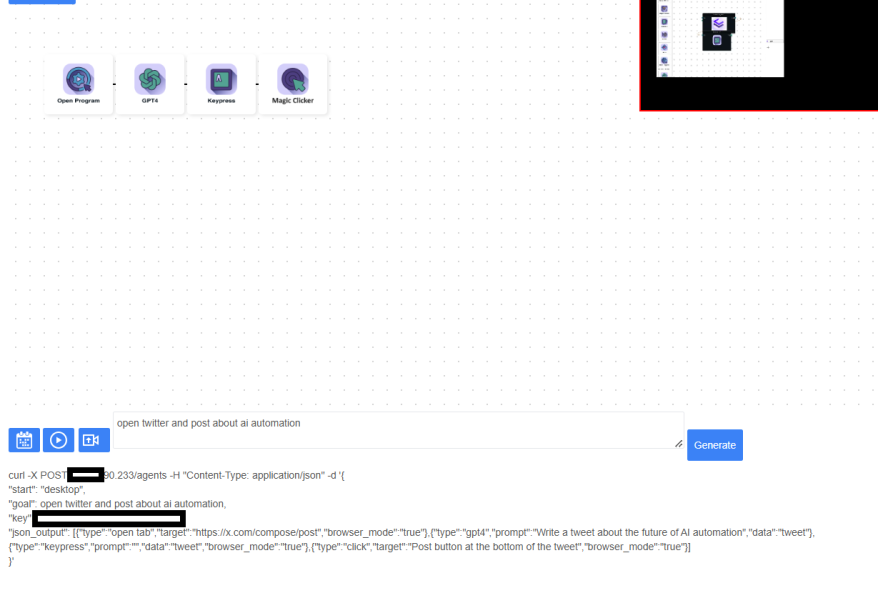
It even returns all the saved agent data during the automation, plus the verification testing loop steps we use to verify each action.
Key Concepts
Nodes: Individual actions an agent can perform
Variables: Data that can be passed between nodes
Verification: Checking if a node's action was successful
Global Variables: Shared data accessible across all nodes
POST /agents
Creates and runs a new agent based on the provided JSON configuration.
Request Body
```
{
"key": "your_api_key",
"json_output": [
{
"type": "action_type",
"parameters": "action_specific_parameters"
},
...
],
"goal": "description_of_agent_goal"
}
```
Response
Returns a string representation of the agent's output data after executing all actions.
Agent Node Types
Desktop+Browser Automation
Delay
Pauses execution for a specified time.
The time to pause in seconds
```
json { "type": "delay", "time": 5 }
```
Keypress
Types text or presses a key.
The text to type or key to press
```
{ "type": "keypress", "prompt": "Hello, World!" }
```
Click
Clicks on a specified target in english.
Description of element to click in simple language Set to true for browser-specific clicks
```
json { "type": "click", "target": "Submit button", "browser_mode": true }
```
Open Tab
Opens a new browser tab.
URL to open
```
json { "type": "open tab", "target": "https://www.example.com" }
```
Data Processing
GPT4
Uses GPT-4 for natural language processing.
System message for GPT-4 Array of input data keys Output variable key
```
json { "type": "gpt4", "prompt": "Summarize the following text:", "input": ["article_text"], "data": "summary" }
```
Python
Executes custom Python code.
Python code to execute
```
json { "type": "python", "code": "import pandas as pd\ndf = pd.read_csv('data.csv')\nprint(df.head())" }
```
Bash
Executes bash commands.
Bash command to execute
```
json { "type": "bash", "command": "ls -la" }
```
Integrations
Google Sheets Create
Creates a new Google Sheet.
Variable to store sheet URL Variable to store sheet name
```
json { "type": "google_sheets_create", "URL": "new_sheet_url", "Sheet_Name": "new_sheet_name" }
```
Google Sheets Add Row
Adds a row to a Google Sheet.
Sheet URL variable Sheet name variable Array of data to add
```
json { "type": "google_sheets_add_row", "URL": "sheet_url", "Sheet_Name": "sheet_name", "data": ["John", "Doe", "30"] }
```
Google Sheets Read
Reads data from a Google Sheet.
Sheet URL Sheet name Variable to store read data
```
json { "type": "google_sheets_read", "URL": "sheet_url", "Sheet_Name": "sheet_name", "data": "sheet_data" }
```
Email
Sends an email.
Recipient email Email subject Email body Variable containing additional data to append
```
json { "type": "email", "to": "recipient@example.com", "subject": "Monthly Report", "body": "Please find the monthly report attached.", "data": "report_data" }
```
API
Makes an API call.
API endpoint Request headers Request body Variable containing data to send Variable to store response
```
json { "type": "api", "URL": "https://api.example.com/data", "headers": {"Content-Type": "application/json"}, "body": {"key": "value"}, "data": "request_data", "output": "api_response" }
```
Utility
Add Data
Loads data from various file types.
Variable to store data File path
```
json { "type": "add_data", "target": "csv_data", "data": "/path/to/file.csv" }
```
Schedule
Schedules the agent to run at specified times.
Cron expression for scheduling
```
json { "type": "schedule", "cron": "0 9 * * 1-5" }
```
Generalized Agent
Performs a generalized action based on a description using our state machine to solve open-ended problems.
Action to perform
```
json { "type": "general", "description": "Search for the latest news articles about AI and summarize them" }
```
Semantic Scrape
Scrapes data based on a semantic description.
Description of data to scrape Variable to store scraped data
```
json { "type": "semanticScrape", "target": "product reviews and ratings", "data": "product_reviews" }
```
Complete Example: Web Scraping and Data Processing Agent
```
json { "key": "your_api_key", "json_output": [ { "type": "open tab", "target": "https://example.com/products" }, { "type": "delay", "time": 5 }, { "type": "semanticScrape", "target": "product listings", "data": "product_data" }, { "type": "gpt4", "prompt": "Analyze the product data and summarize the findings", "input": ["product_data"], "data": "analysis_result" }, { "type": "google_sheets_create", "URL": "sheet_url", "Sheet_Name": "sheet_name" }, { "type": "google_sheets_add_row", "URL": "sheet_url", "Sheet_Name": "sheet_name", "data": ["analysis_result"] }, { "type": "email", "to": "manager@company.com", "subject": "Product Analysis Report", "body": "Please find the latest product analysis attached.", "data": "analysis_result" } ], "goal": "Scrape product data, analyze it, save to Google Sheets, and email the results" }
```
Best Practices
1. Use descriptive names for variables to make the workflow clear.
2. Add appropriate delays between actions to allow for page loading.
3. Handle errors gracefully by checking node verification results.
4. Use GPT-4 nodes to add flexibility and intelligence to your agents.
5. Leverage integrations like Google Sheets for data storage and sharing.
6. When using the python node, ensure all necessary libraries are imported.
7. For file operations in the add\_data node, ensure file paths are correct and accessible.
8. When scheduling agents with the schedule node, use correct cron syntax.
9. For API calls, double-check URL, headers, and body parameters.
10. Use the general node for complex actions that may require multiple steps.
By following this documentation, you can create sophisticated automated agents capable of handling a wide range of tasks across multiple platforms and services. The Agents API provides a flexible and powerful framework for defining complex sequences of actions, data processing, and integrations.